

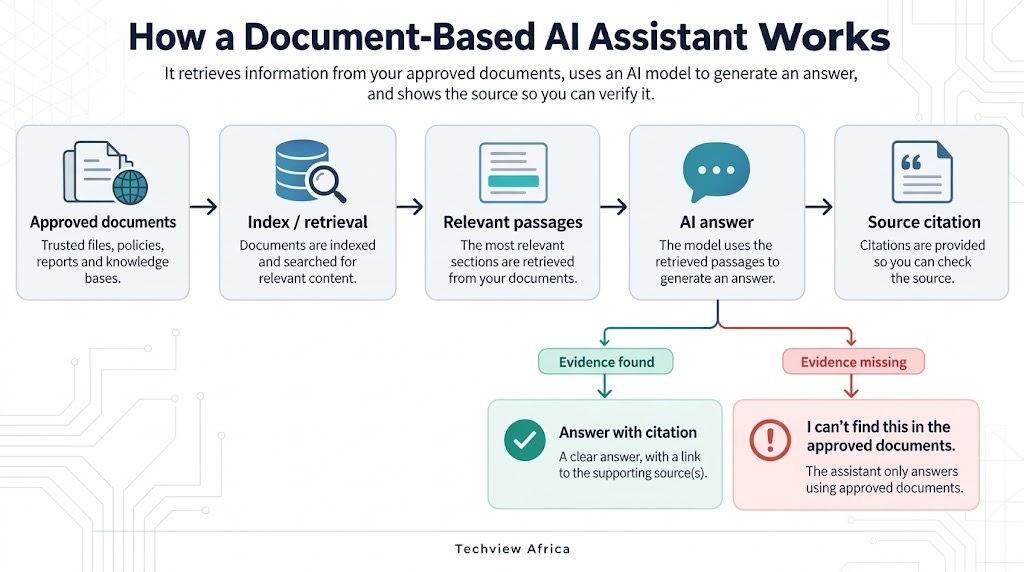
The real product is not a chatbot that has read your files. It is a system in which important answers can be traced back to documents you control.
How to Build an AI Assistant That Answers From Your Documents and Cites Its Sources
Ask an ordinary chatbot about your organisation’s leave policy and it may answer from general knowledge. A properly designed document assistant should do more: find the relevant policy, answer from it, show the source and admit when the documents do not contain the answer.
Businesses can use manuals and product documentation; universities can use regulations and course materials; researchers can question paper libraries; newsrooms can search archives. But uploading PDFs is only the beginning.
Start with the documents the assistant is allowed to trust
The first design decision is not the model. It is which documents count as authoritative. Imagine uploading employee handbooks from 2023, 2025 and 2026. If all three remain equally searchable, the assistant may retrieve an obsolete rule and cite it perfectly. That is not a hallucinated source. It is still a bad answer.
Build the knowledge base from approved material and separate current files from drafts, archives and superseded versions. Use metadata such as department, publication date, country, document type and status. OpenAI File Search supports vector stores and metadata filtering, while Claude Projects can use retrieval when a project library becomes too large to load at once.
What RAG actually does
Retrieval-augmented generation, or RAG, means the system searches an external knowledge collection before the language model composes its answer. Documents → parsing/indexing → retrieval → relevant passages → model → answer + citations
| Stage | What must happen |
|---|---|
| Source library | Include the correct files |
| Parsing/indexing | Make sure the system can read the material |
| Retrieval | Find the right passage |
| Answer | Keep the response close to the evidence |
| Citation | Make the evidence inspectable |
| Access control | Show users only authorised knowledge |
Failures at any stage can produce a wrong answer. The model is only one part of that chain.
You do not have to build the first version from scratch
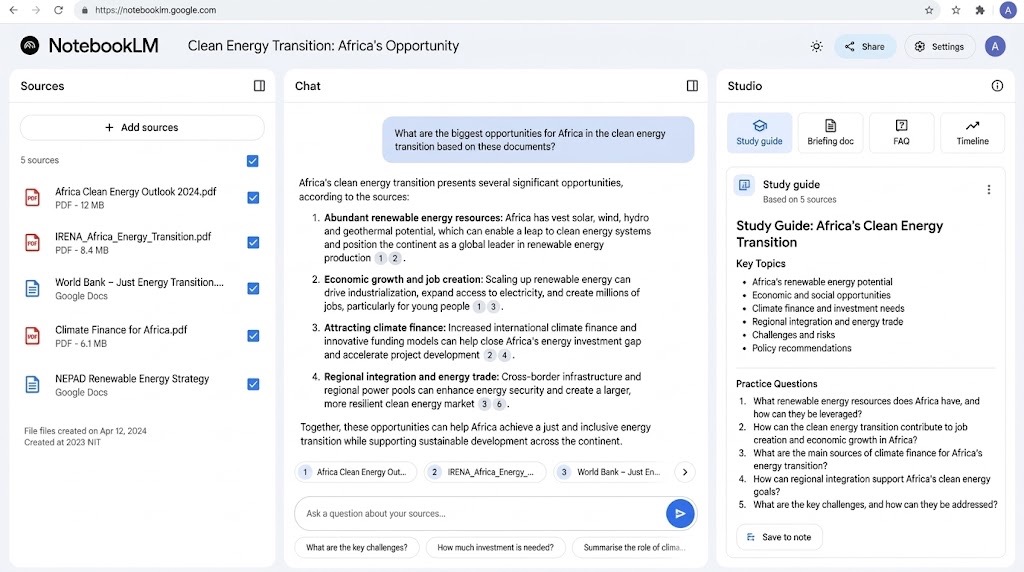
For a contained knowledge base, hosted tools may be enough. OpenAI GPT knowledge can attach reference files to a custom GPT, Claude Projects can maintain project knowledge, and Google’s NotebookLM is designed around questioning supplied sources with citations.
A custom retrieval layer becomes useful when you need tighter control over metadata, authentication, source versions, permissions or the interface. The model should not decide which documents a user is allowed to retrieve. Authentication and permissions belong in the application and retrieval layers. Techview Africa’s guide on how far AI can take a non-programmer when building an application makes the same point: interfaces do not replace authentication or data-access controls.
A citation should take the user close to the evidence
“Source: Employee Handbook.pdf” is better than nothing, but it can still leave someone searching through 180 pages. Better systems point to the page, section or passage supporting the answer. Microsoft Copilot Studio can provide page-level citations for certain SharePoint-connected PDF sources.
The test is simple: Does the cited passage actually support the answer?
For HR policies, university rules, compliance documents, contracts or technical procedures, citation should be part of the answer, not decoration.
Refusing to answer is a capability, not a failure
Suppose someone asks:
“Does our company pay for employees’ home internet?”
If the approved documents do not answer it, the assistant should not improvise. It should say:
“I cannot find an answer to that question in the approved documents available to me.”
Microsoft Copilot Studio exposes this distinction through its ungrounded-response controls.
A useful instruction is:
``` Answer from approved knowledge sources.
Cite the supporting document.
If sources conflict, identify the conflict.
If the documents do not support an answer, say so.
Do not fill missing policy information from general knowledge. ```
Instructions help, but they do not replace retrieval controls, permissions or evaluation.
Permissions and versioning are part of answer quality
A document assistant makes information easier to discover. That becomes dangerous if it retrieves something the user was never authorised to see.
A university may have public course guides and restricted staff procedures. A company may have a general handbook and separate compensation files for HR. Do not flatten them into one searchable bucket.
Microsoft notes that connected SharePoint and OneDrive knowledge can respect user credentials and stay synchronised, while uploaded copies are static. Versioning matters because yesterday’s policy should not become today’s answer.
Test the evidence, not how fluent the chatbot sounds
Start with questions where you already know the correct document and supporting passage. Include simple lookups, multi-document questions, contradictory versions, unsupported questions and questions the user should not be authorised to answer.
For every test, record four things:
What did it retrieve?
What did it answer?
What did it cite?
Should this user have been allowed to see it?
If retrieval is wrong, rewriting the prompt may not fix the problem. If the citation is wrong, citation quality needs work. If an unsupported question still gets an answer, fallback rules need tightening. If confidential information reaches the wrong user, the failure is access control. This is the difference between demonstrating an AI assistant and evaluating one.
This is not the same as ordinary AI research
Techview Africa has already explained how to use AI for research without repeating its mistakes. A document assistant solves a different problem: deciding which sources the AI may search, what it may retrieve, when it may answer and what evidence the user can inspect. A dependable system should cite the current policy, identify conflicts, refuse unsupported questions, respect permissions and update when authoritative documents change. The model can make conversation feel effortless; the engineering work is making the evidence inspectable.
Our Recommendation
Start with one controlled document set: a product manual library, course handbook or approved policy collection. Require citations, discourage unsupported answers and test questions the assistant should not answer as carefully as those it should.
Expand only after retrieval, citations, permissions and versioning are working reliably. The goal is not to make an AI sound as though it understands your organisation. The goal is to make important answers traceable to something your organisation actually wrote.
Verification Links
OpenAI File Search documentation
Claude RAG for Projects documentation
Microsoft Copilot Studio knowledge-source documentation
Frequently asked questions
What is the difference between uploading a PDF to a chatbot and building a document assistant?
A one-off upload gives the AI temporary access to material for a conversation. A document assistant treats an approved collection as a persistent knowledge source and adds retrieval, citations, update rules and where needed user permissions around it.
What is RAG in simple terms?
Retrieval-augmented generation means the system searches an external knowledge collection for relevant information before asking the language model to compose its answer. The model therefore receives evidence related to the specific question rather than relying solely on what it learned during training.
Do I need to know how to code to build one?
Not necessarily. Custom GPTs, Claude Projects, NotebookLM and Copilot Studio can all support document-grounded workflows without requiring someone to build a vector database from scratch. Coding becomes more valuable when you need custom interfaces, large collections, advanced retrieval, application integrations or detailed permission controls.
Can citations completely prevent AI hallucinations?
No. A citation helps a user inspect the evidence, but an AI can still misinterpret a real source, select the wrong passage or draw an unsupported conclusion. Google explicitly cautions that even NotebookLM, despite grounding its answers in supplied sources and providing citations, can generate inaccuracies. (blog.google)
Should the assistant be allowed to use the open web as well as my documents?
Only if the use case requires it. For an internal policy or regulated knowledge assistant, mixing open-web information with approved internal material can make provenance harder to understand. If web information is necessary, label it separately so users can distinguish internal evidence from external information.
What should the assistant say when the documents do not contain an answer?
It should say so clearly. A useful response is: “I cannot find that information in the approved documents available to me.” That is usually more valuable than a plausible answer whose origin cannot be verified.
What documents work best?
Clear, text-readable files with sensible headings and structure generally work better than poorly scanned pages, complicated visual layouts or documents where important information exists only inside unlabelled graphics. OpenAI similarly recommends clear, text-forward files for GPT knowledge. (help.openai.com)

How to Build a Website With AI That You Can Still Edit, Move and Own

How to Create a Professional Presentation With AI Without the Generic AI Look

Before You Connect AI to Your Email, Files or Photos, Check These 5 Things

Seven Free AI Tools That Are Actually Useful on a Smartphone
A Script Is Not a Video Prompt: How to Turn One Into a Finished AI Video
How to Build a Working App With AI Without Knowing How to Code

How to Use AI to Strengthen Your LinkedIn Profile for Remote Roles
Follow TechView Africa on WhatsApp
Get TechView Africa updates on WhatsApp. Follow our channel for practical technology news, product guides and digital trends from Nigeria and across Africa.
Leave a comment
Comments cannot be edited or deleted after posting. Please review your comment before submitting.
No comments yet. Start the conversation.