

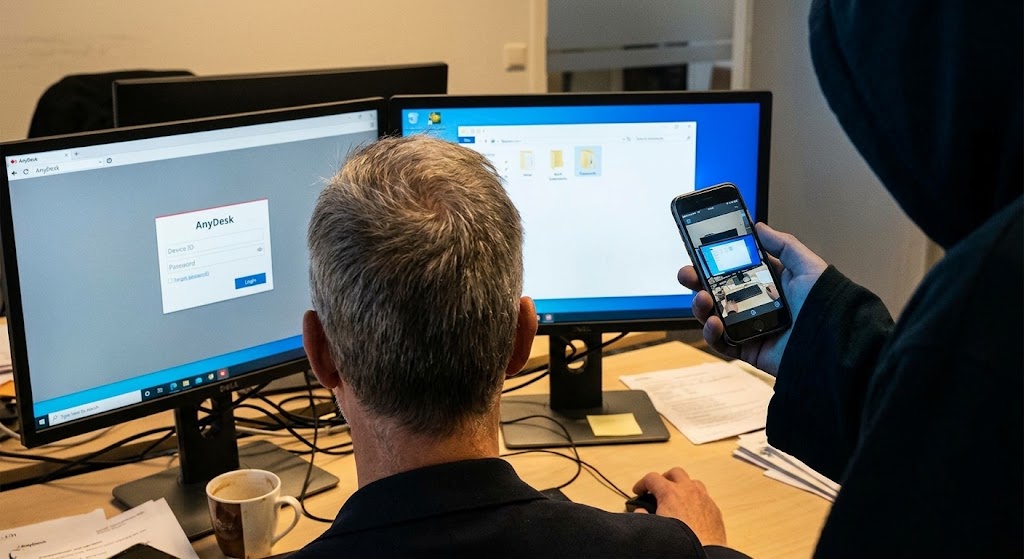
Remote-access apps are not inherently malicious, but you should never install one because an unexpected caller or message tells you to. If someone claiming to be from a bank, technology company or support service urgently wants access to your screen, end the conversation and verify them independently.
Remote-support software can be genuinely useful when someone you trust needs to help with a device, but in the hands of a scammer, the same technology can turn a phone or computer into a window through which passwords, banking activity and private information may be exposed.
Scammers want victims to install screen-sharing or remote-access software because it can give them something more valuable than a single password: visibility into what is happening on the device and, depending on the permissions granted, the ability to interact with it remotely. The software itself may be completely legitimate. Businesses, IT teams and families use remote-support tools every day, but the US Federal Trade Commission's guidance on tech-support scams warns that criminals also persuade victims to provide remote access, sometimes while pretending to diagnose a fake computer problem or protect an account.
Microsoft gives similar advice in its tech-support scam guidance, warning that scammers may ask people to install legitimate remote-access applications and then use that access to steal information, manipulate what the victim sees or install unwanted software. The danger, therefore, is not simply the app; it is who asked you to install it and what permissions you give them.
Screen sharing and remote control are not exactly the same
It helps to understand the distinction. With basic screen sharing, another person can see what is displayed on your device, which is already sensitive if you open email, banking apps, password managers or documents while the session is active.
Remote-control functionality goes further, allowing another person to interact with the computer or device after permission is granted, which may include clicking buttons, opening files, changing settings or typing into applications. Microsoft's Quick Assist documentation makes this distinction clear, explaining that a helper can see the screen and, when specifically permitted, control the PC.
That is useful when the helper is someone you trust and the support session is one you deliberately initiated; when the person on the other end is a criminal, however, those same capabilities become extremely risky.
The scam usually begins with a believable problem
Remote-access scams often start somewhere completely different from the app itself. You may receive a phone call claiming that your computer has been infected, a message saying a suspicious payment is about to leave your account, or a fake warning that tells you to contact “support” immediately. Once the scammer has created enough fear, the remote-access request can be presented as the solution.
The FTC describes this pattern in its explanation of tech-support scams, where fraudsters first convince victims that something is wrong, then request remote access while pretending they are going to fix the supposed problem.
Urgency is useful to the scammer because a person who is worried about losing money or having a device hacked may be less likely to stop and ask why a stranger needs control of the screen in the first place.
Why banking activity becomes particularly dangerous
A remote session becomes especially sensitive when the person directing it asks you to open your bank account, email or another financial service. Even if the scammer cannot directly complete every transaction, being able to observe what appears on the screen can expose information that should remain private, while broader remote-control permissions may create opportunities to manipulate the session or interfere with what the user is doing.
This is why requests such as “open your banking app so I can help you secure the account” should be treated as a major warning sign when they come from an unsolicited caller.
Nigeria's ngCERT has warned about malicious remote-control capabilities in Android banking threats, documenting malware capable of taking screenshots, accessing information and carrying out actions on infected devices. That advisory concerns malware rather than legitimate remote-support software, so the two should not be confused, but the underlying security lesson is similar: remote visibility and control over a device can expose financial information and create opportunities for fraud.
Some scammers may even make normal activity look suspicious
Once a fraudster can see or control a computer, they may use ordinary system information to convince the victim that something is badly wrong. Microsoft warns that scammers with remote access can misrepresent normal system messages as evidence of viruses or other problems, making their fabricated story appear technical and convincing.
The victim may then be pressured into paying for unnecessary repairs, purchasing fake security products or taking further actions supposedly required to “protect” the account. This is one reason trying to judge whether the person sounds technically knowledgeable is not enough; a convincing explanation does not establish that the person has any legitimate reason to access your device.
Legitimate remote support does exist
The correct response is not to assume that every remote-support session is fraudulent. Remote-access tools are widely used by legitimate IT departments, businesses and trusted technicians, while people may also use them to help relatives troubleshoot problems. What matters is how the interaction began and whether you independently know who is requesting access.
Microsoft advises users of Quick Assist to allow a helper to connect only when they trust the person, and specifically warns users to be cautious when support was not initiated through a legitimate channel. If you need help from your bank, internet provider, device manufacturer or employer, contact the organisation yourself using its official website, app or a number you already trust, rather than installing software because someone unexpectedly contacted you.
What if you already gave someone remote access?
If you become suspicious during a session, stop the connection immediately and do not continue following the caller's instructions. If the person had remote control of the device, particularly while sensitive accounts were open, treat the situation seriously; remove software that was installed at their direction if you no longer need it, review the device for unexpected applications or changes and secure important accounts from a trusted device where appropriate.
Microsoft recommends changing compromised passwords and checking the device if a scammer has been given access, while the FTC advises people who paid a scammer to contact the company used to send the money and ask whether the transaction can be reversed. If banking information or money may have been exposed, contact the financial institution through its official channel as quickly as possible.
Our Recommendation
The most important question when someone asks you to install a remote-access application is not “Is this app legitimate?”, because criminals often abuse legitimate tools. Ask instead: “Why does this person need access to my device, and did I independently verify who they are?”
A genuine support interaction that you initiated with an organisation you trust can have a legitimate reason for screen sharing, but an unexpected caller who creates an emergency and then asks you to install software deserves a very different response.
End the conversation, contact the organisation yourself and verify the situation before granting anyone access. Once another person can see or control your screen, you may be giving them access to far more than the problem they claimed they were trying to solve.
Sources & Verification
US Federal Trade Commission — How to Spot, Avoid and Report Tech Support Scams
Microsoft — Protect Yourself From Tech Support Scams
Microsoft — Using Quick Assist Safely
US Federal Trade Commission — Tech Support Scams
ngCERT — Brokewell Malware Targeting Android Banking Applications
Frequently asked questions
Are remote-access apps themselves scams?
No. Remote-access and screen-sharing software has many legitimate uses, including IT support and helping trusted friends or relatives with technical problems. The risk arises when scammers deceive people into granting them access.
Can someone steal money just by seeing my screen?
Screen visibility can expose sensitive information, while remote-control permissions can create additional risks. Whether money can actually be moved depends on the device, banking service, authentication controls and permissions available.
Should a bank ask me to install a remote-access app?
Be extremely cautious if an unsolicited caller claiming to represent a bank asks you to install software or share control of your device. End the interaction and contact the bank independently through its official app, website or trusted phone number.
What should I do if a stranger asks me to share my screen?
Do not proceed simply because the person sounds convincing. Verify their identity independently and understand exactly what they will be able to see or control before granting any access.
Is screen sharing safer than full remote access?
Screen sharing generally grants fewer capabilities than full remote control, but it can still expose passwords, messages, financial information and other private material visible on the screen.
What should I do after giving a scammer remote access?
Disconnect the session, stop communicating with the scammer and review the device for software or changes made during the session. Secure important accounts and contact your bank promptly if financial information or transactions may have been affected.
We Analysed 200 Scam Messages Sent to Nigerians: Here’s How Fraudsters Try to Make People Act
Buying on Facebook Marketplace in Nigeria? 9 Checks Before You Meet or Pay a Seller
That Remote Job Offer Could Be an Identity Harvesting Scam
That Customer Care Account in Your DMs May Be Fake: Here’s How to Check
Your Email Appeared in a Data Breach: What Does That Actually Mean
Google Search Can Lead You to Scam Phone Numbers: Why You Should Verify Support Lines
Deepfake Voice Scams: How to Verify an “Emergency” Call Before You Act
Follow TechView Africa on WhatsApp
Get TechView Africa updates on WhatsApp. Follow our channel for practical technology news, product guides and digital trends from Nigeria and across Africa.
Leave a comment
Comments cannot be edited or deleted after posting. Please review your comment before submitting.
No comments yet. Start the conversation.