

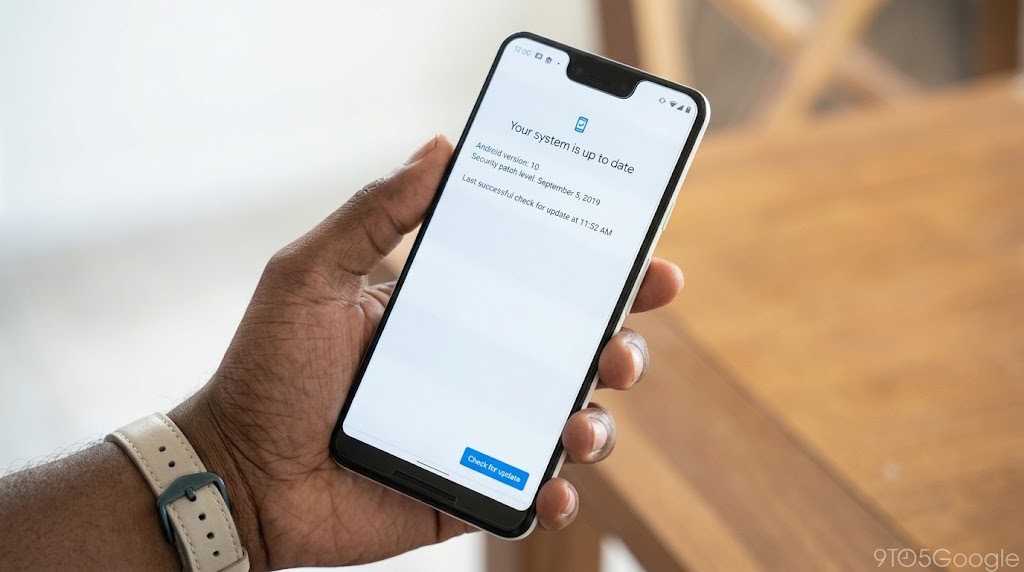
Having the latest Android version does not necessarily mean your phone has the latest security protection. The Android security patch date is a separate indicator, and a phone reporting that its software is up to date may simply have the newest update currently available for that model.
Google's October security update makes one phone setting worth checking
To check your Android security patch level, open Settings → About phone → Android version and look for Android security update. On some devices, the information appears under Software information or Security and privacy. Compare the displayed date with Google's latest security bulletin, then check for available software updates.
Google published its October 2026 Android Security Bulletin on 5 October, documenting vulnerabilities affecting different parts of the operating system. Several were classified as critical, including flaws in Android's System component that could allow an attacker to gain higher privileges under certain conditions.
The bulletin identifies vulnerabilities such as CVE-2026-55269 and CVE-2026-55280. Google says some of the most serious System issues could be exploited without additional user interaction, although their classification does not establish that attackers are actively exploiting them.
According to the official October Android Security Bulletin, devices displaying an Android security patch level of 1 October 2026 or later address the issues covered by that patch level.
There is an important distinction, however: Google publishing a security fix does not mean it has already reached every Samsung, Tecno, Infinix, itel, Xiaomi or other Android phone. To understand whether your device has received the protection, you need to check its installed security patch.
Android version versus security patch level: what is the difference?
These two details appear together in your phone's settings, but they tell different stories.
Android version identifies the main operating system release installed on your device, such as Android 14, 15, 16 or 17. Major releases can introduce new features, design changes and platform improvements.
Android security patch level identifies the security fixes incorporated into the installed software, represented by a date.
For example, a phone running Android 15 with a recent security patch can have newer security fixes than a phone running Android 16 with a much older patch date.
Neither number should be assessed in isolation. A manufacturer can deliver security fixes without upgrading the phone to the latest major Android release, provided the device remains supported and the relevant fixes are available for it.
There is also a third entry: Google Play system update. This covers selected system components distributed through Google's update mechanism. It is not a replacement for the manufacturer's Android security patches.
How to check your Android security patch level
Google's published instructions provide a starting point for most Android devices.
- Open your phone's Settings app.
- Scroll to About phone or About device.
- Select Android version or Software information.
- Find the entry labelled Android security update, Android security patch level or similar.
- Record the displayed date, along with your Android version and Google Play system update date.
If the options differ on your handset, use the search function inside Settings and enter security update, Android version or software update.
For the October 2026 bulletin, a security patch date of 1 October 2026 or later indicates that the manufacturer has incorporated the fixes required for that Android bulletin level. Google's separate Pixel bulletin identifies 5 October 2026 as the level covering its additional Pixel-specific issues.
A newer patch date does not guarantee protection against every future vulnerability, but it provides a more useful indication of installed security fixes than the Android version number alone.
How to update Samsung, Tecno, Infinix and itel phones
Android manufacturers customise their settings menus, so the exact instructions depend on your model and software release.
| Phone brand | Where to check for updates |
|---|---|
| Samsung Galaxy | Settings → Software update → Download and install |
| Tecno | Settings → System or System Update; use Settings search if necessary |
| Infinix | Look for System Update or Software Update in Settings |
| itel | Look under System, About phone or Software Update |
| Google Pixel | Settings → System → Software updates |
Samsung documents its update procedure directly. For Tecno, Infinix and itel, the menu descriptions above are navigation guidance rather than verified instructions for every model.
Before installing an update, connect to a reliable Wi-Fi network where possible, ensure sufficient storage and charge your battery. Google recommends having at least 75% battery charge before starting.
In Nigeria, large downloads can consume a substantial mobile data allowance. If your connection is metered, review the update size before downloading. Avoid interrupting installation once it begins.
After the phone restarts, return to the Android security update screen and check whether the patch date has changed. Some devices may require more than one update to reach their latest available software version.
Why your Android phone may not receive the October patch immediately
Android updates do not arrive on every device simultaneously. Google develops and publishes Android security fixes, but manufacturers must incorporate applicable changes into their own software, test them and distribute compatible updates.
The process can involve chipset compatibility, manufacturer customisations, testing requirements and regional or network-operator approval.
This helps explain why two phones from the same brand may show different security patch dates. Their model, region, software build and support schedule can all matter.
A more expensive or newer-looking device is not automatically better supported. Before buying a smartphone, particularly a used or imported model, ask how long it will continue receiving security updates.
TechView Africa's guide to checking whether a supposedly new smartphone is refurbished provides other useful checks before purchase.
What if your Android phone says it is up to date but the patch is old?
The message “Your software is up to date” can be misleading if interpreted as proof that the handset has every security fix Google has published.
Usually, it means the device's update service has not found a newer package available for that handset at that moment.
Start by restarting the phone, connecting to a stable network and checking for updates again. Also inspect the separate Google Play system update option, where available.
If the security patch remains several months old, contact your manufacturer's support service with the exact model number, software build, region and installed patch date. Ask whether the model is still receiving security maintenance.
For Tecno, Infinix and itel owners in Nigeria, Carlcare Nigeria provides official after-sales support and software-upgrade services.
If your handset has reached the end of its security-support period, consider replacing it, particularly if you depend on it for banking, business accounts, authentication and other sensitive activities.
Before changing devices, follow TechView Africa's safe phone-transfer and factory-reset guide to avoid losing important accounts or data.
Protecting your Android phone between updates
Security updates matter, but they are only one part of maintaining a safer phone. Keep applications updated, use a strong screen lock and avoid installing unfamiliar APK files promoted through messages or untrusted websites.
On devices with Google Play services, check that Play Protect remains enabled under Play Store → Profile → Play Protect → Settings.
Google Play Protect can identify potentially harmful applications, but it cannot replace missing operating-system fixes.
The most useful habit is simple: check your security patch date regularly, install legitimate updates when available and investigate unusually long gaps in manufacturer support.
Our Recommendation
Check your Android security patch level today and make a habit of reviewing it when Google publishes new monthly security bulletins.
If your Samsung, Tecno, Infinix or itel phone has an older patch, search for an official update rather than downloading firmware from an unfamiliar website.
A phone without the newest Android version can still receive important security fixes. What matters is whether its manufacturer continues maintaining the device, how recently it received those fixes and whether any known support limitations affect your model.
Sources & Verification
Android Open Source Project — October 2026 Android Security Bulletin
Google — Check and Update Your Android Version
Google — October 2026 Pixel Security Bulletin
Samsung — How to Update Galaxy Phone Software
Google — Use Google Play Protect
Carlcare — Official Nigeria Support for Tecno, Infinix and itel
Frequently asked questions
Is Android 16 or 17 safer than Android 14?
Newer Android releases generally include security improvements, but security also depends on the patches installed. A supported older release with recent security updates may have fixes missing from a newer release with an outdated patch level.
Does updating Google Play automatically update Android security patches?
No. Google Play system updates can protect selected Android components, but they do not necessarily install the full manufacturer-delivered Android security update.
Why has my Tecno, Infinix or itel phone stopped receiving updates?
Possible reasons include phased regional delivery, software compatibility, temporary update problems or the end of the device's manufacturer-support period. The exact reason should be checked against the model's official support information.
Will updating Android delete my photos and WhatsApp messages?
A routine official Android update is intended to preserve user data. Nevertheless, keeping a recent backup is sensible because installation or device problems can occur.
Can I manually install Google's October Android security patch?
Most users should install updates through their manufacturer's official update system. The Android security bulletin is not a universal installation package that can be safely downloaded and applied to every Android phone.
How to Check AI Images, Videos and Audio With Google's SynthID Detector
Authenticator Apps Are Safer Than SMS But What Happens If You Lose Your Phone?

Liquid Network Paused After $320 Million Bitcoin Withdrawal: What Happened

Can Someone Hack Your Phone Just by Calling You? Separate Fact From Fear
That Customer Care Account in Your DMs May Be Fake: Here’s How to Check

Before Installing a Free VPN, Check This
Passkeys vs Passwords: What Actually Makes Passkeys Safer
Follow TechView Africa on WhatsApp
Get TechView Africa updates on WhatsApp. Follow our channel for practical technology news, product guides and digital trends from Nigeria and across Africa.
Leave a comment
Comments cannot be edited or deleted after posting. Please review your comment before submitting.
No comments yet. Start the conversation.