

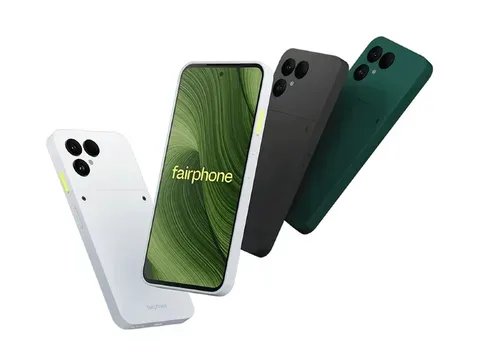
A smartphone is enough to begin learning many tech skills and build momentum. More advanced technical work eventually benefits from a computer, but lack of one should not prevent the first stage of learning.
No laptop? That does not automatically mean no tech career. A modern smartphone can take you surprisingly far from learning to code and building simple websites to designing graphics, studying cybersecurity and creating a portfolio. But there is a point where the small screen stops being a starting point and starts becoming a limitation.
Yes, you can start a tech career with only a smartphone.
You can use one to:
- Take professional courses
- Learn coding fundamentals
- Write and run basic code
- Build simple websites
- Study cybersecurity
- Learn digital marketing
- Create graphics and social content
- Practise data-analysis concepts
- Build a basic portfolio
- Apply for internships and freelance work
But there is an important distinction:
A smartphone can be enough to start learning tech. It is rarely enough to do every tech job professionally.
For coding, data analysis, cloud engineering, technical cybersecurity and serious design work, a laptop eventually becomes less of a luxury and more of a productivity tool.
Which tech careers can you start on a phone?
| Career path | Can you start with a phone? | Laptop needed? |
|---|---|---|
| Digital marketing | Yes | Not immediately |
| Social media management | Yes | Not immediately |
| Technical writing | Yes | Eventually |
| Graphic/content design | Yes | Eventually |
| Web development | Yes | Fairly soon |
| UI/UX design | Yes, for fundamentals | Fairly soon |
| Data analysis | Yes, for fundamentals | Soon |
| Cybersecurity | Yes, especially theory/GRC | Soon for technical labs |
| Software engineering | Yes, for fundamentals | Soon |
| Cloud computing | Yes, for learning | Soon |
1. Your phone is already good enough to start learning
One reason people delay entering tech is hardware.
They see developers using MacBooks, analysts with multiple monitors and cybersecurity professionals running virtual machines and assume they need all of that before lesson one.
They do not.
A beginner programmer first needs to understand concepts such as variables, functions, loops and data structures.
A cybersecurity beginner needs to understand networks, threats, access control, risk and security principles.
A future data analyst needs to learn spreadsheets, statistics, SQL and how to interpret data.
None of those ideas requires an expensive computer.
Courses, documentation, videos, PDFs and quizzes all work perfectly well on a smartphone.
TechView takeaway: If you are waiting to buy a laptop before starting your first tech course, you may be waiting unnecessarily.
2. Yes, you can actually code on a phone
This is where things become more interesting.
Modern cloud-development platforms mean the phone does not always have to perform all the heavy computing itself.
Replit, for example, offers a mobile app that allows users to create and work on websites and applications from a smartphone.
Verification: Replit Mobile
GitHub's Codespaces goes even further. It provides a development environment running remotely in the cloud, with code editing, a terminal, debugging tools and Git integration accessible through a browser.
Verification: GitHub Codespaces documentation
For Python learners, Google Colab provides browser-based notebooks capable of running Python without requiring a full local Python installation.
Verification: Google Colab
That means you can genuinely practise programming without first owning a computer.
But there is a catch.
3. Coding on a phone gets annoying very quickly
Writing this on a phone is easy:
print("Hello, world!")Managing a serious project is different.
Professional development may require you to see:
- Code
- Project folders
- Documentation
- Error messages
- A terminal
- Browser output
- Git changes
- Database information
all within the same workflow.
That is where a 6-inch screen starts feeling very small.
Programming also involves characters such as:
{ } [ ] < > / \ | ; :Typing them repeatedly on a touchscreen is far slower than using a physical keyboard.
So the real limitation is often not computing power.
It is screen space, typing speed and multitasking.
A phone can teach you programming.
A laptop eventually helps you program efficiently.
4. Web development is one of the best technical places to start
If you want to learn coding with only a smartphone, front-end web development is particularly practical.
Start with:
- HTML
- CSS
- JavaScript
- Git and GitHub
- Responsive design
You can immediately see the result of what you build.
A simple portfolio website, calculator, landing page or JavaScript project can all become early portfolio pieces.
Platforms such as Replit make it possible to create and deploy web projects from a browser or mobile device.
Verification: Replit
Eventually, however, larger React projects, backend development, databases and professional debugging become much easier on a computer.
TechView verdict: Web development is an excellent phone-first learning path—but do not plan to remain phone-only forever.
5. Data analytics and cybersecurity have a shorter phone-only runway
You can learn a surprising amount of data analytics from your phone.
That includes:
- Excel concepts
- SQL
- Statistics
- Python
- Pandas
- Data visualisation
- Business analysis
Google Colab can handle introductory Python exercises from a browser.
But imagine analysing a spreadsheet containing thousands of rows on a 6.5-inch screen.
Possible? Yes.
Comfortable? Not really.
The same applies to cybersecurity.
A smartphone is excellent for studying:
- Networking
- Governance, Risk and Compliance
- Privacy
- Security frameworks
- Identity and access management
- Threats and vulnerabilities
- Security policies
That makes careers such as cybersecurity GRC and privacy particularly accessible during the learning stage.
The problem begins when technical training requires virtual machines, packet analysis, command-line tools or multiple operating systems.
At that stage, a laptop becomes essential.
6. Digital marketing and content creation are far more phone friendly
Some tech careers fit smartphones naturally.
Digital marketing is one of them.
You can learn and practise:
- Social media strategy
- Copywriting
- Content marketing
- SEO fundamentals
- Audience research
- Short form video
- Basic advertising
- Analytics
- Graphic design
And you can actually build evidence of your skills directly from the device.
Create a fictional campaign for a restaurant.
Design 10 social posts.
Write the captions.
Build a 30-day content plan.
Explain which audience you are targeting and why.
Now you have something far more valuable than another certificate: a portfolio project.
Canva is especially useful here because its mobile apps support graphic design, presentations, social content and other creative formats.
Verification: Canva Design Tools
For someone who may remain without a laptop for several months, digital marketing, social-media management and content creation are among the most realistic phone-first career paths.
7. AI makes your phone much more powerful but there is a trap
Generative AI has dramatically lowered the hardware barrier to learning.
You can use an AI assistant to:
- Explain difficult concepts
- Break down error messages
- Generate practice exercises
- Explain code
- Suggest projects
- Review writing
- Summarise documentation
Some development platforms now go further by allowing AI to help generate entire applications.
That can be incredibly useful.
It can also create an illusion of competence.
If AI builds an application but you cannot explain:
- How the code works
- What each function does
- Why an error occurred
- How the application stores data
- How to change the project manually
then you have produced software without necessarily learning software development.
Use AI to accelerate understanding, not replace it.
8. Build projects not a folder full of certificates
This may be the most important part.
A smartphone makes it easy to watch courses.
That can become a trap.
Three months later, you might have eight certificates and nothing that demonstrates what you can actually do.
Instead:
If you are learning web development: build websites.
If you are learning data: analyse datasets.
If you are learning design: create designs.
If you are learning marketing: build sample campaigns.
If you are studying cybersecurity GRC: create a sample risk register, security policy review or controls assessment.
Your portfolio does not need real customer information.
Fictional projects are perfectly useful when they demonstrate genuine skills.
Employers ultimately care about whether you can apply what you learned.
9. A Bluetooth keyboard may be your cheapest major upgrade
Before buying a laptop, consider one inexpensive accessory:
a Bluetooth keyboard.
It can transform smartphone-based learning.
Typing code, assignments, emails and documentation becomes dramatically easier.
A simple phone stand plus keyboard can create a basic mini-workstation for far less than the cost of a computer.
It will not replace a laptop.
But it can make the months before buying one much more productive.
10. When should you finally buy a laptop?
Do not upgrade simply because everybody else has one.
Upgrade when the phone itself starts slowing down your progress.
Warning signs include:
- Constantly switching between several apps
- Difficulty managing project files
- Courses requiring desktop-only software
- Larger spreadsheets becoming impossible to navigate
- Coding projects becoming difficult to debug
- Cybersecurity labs requiring virtual machines
- Needing several windows open simultaneously
- Professional client workflows becoming frustrating
At that point, a laptop stops being a status symbol.
It becomes work equipment.
And your first machine does not have to be premium.
For many beginners, a sensible Windows laptop with at least 8GB of RAM, SSD storage and a modern processor can provide a huge productivity jump.
A realistic phone-first roadmap
Month 1 — Pick one skill
Do not start programming, cybersecurity, data analysis, UI/UX and digital marketing at the same time.
Choose one.
Learn the fundamentals.
Month 2 — Practise
Stop watching tutorials continuously.
Try exercises without copying the instructor.
Month 3 — Build something
Create your first independent project.
It does not need to be impressive.
It needs to prove you understood something.
Months 4 & 5 — Build your portfolio
Create another two or three stronger projects.
Document what you did and why.
Month 6 — Start looking for opportunities
Explore:
- Internships
- Freelance projects
- Volunteer opportunities
- Entry-level roles
- Professional communities
- Open-source projects where appropriate
By then, you will probably know whether your phone is still enough.
What you should not believe
Two claims are equally misleading.
The first is:
“You cannot enter tech without a laptop.”
That is no longer true.
The second is:
“A phone can completely replace a laptop for every tech career.”
That is not true either.
A smartphone can be an excellent starting platform.
It is rarely the ideal permanent workstation.
Final verdict
Yes, you can start a tech career using only a smartphone.
In 2026, cloud tools make that more realistic than ever.
Replit supports mobile development workflows. GitHub Codespaces provides cloud-based development environments. Google Colab lets beginners run Python from a browser. Canva puts substantial design capability on a phone.
Verification and reference links:
So if a laptop is currently beyond your budget, do not use that as a reason to postpone day one.
Start learning.
Build something.
Create evidence of your ability.
Then, when your projects finally outgrow the phone, buy a computer because you need a better tool for the career you have already started building.
Not because you are still waiting to begin.
This article was last verified on 21 August 2026. Features and access conditions for cloud-development and learning platforms can change. Readers should confirm current platform requirements through the official reference links before choosing a long-term workflow. TechView Africa has no stated affiliate relationship with the platforms referenced above.
Sources & Verification
Leave a comment
Comments cannot be edited or deleted after posting. Please review your comment before submitting.

How to Turn Raw Data Into Charts, Insights and a Finished Report With AI
How to Create a Consistent Brand Identity With AI Instead of Random AI Graphics
How to Create a Product Launch Video With AI From Assets You Already Have
How to Apply for Nigeria’s National AI Innovation Challenge 2026

A Script Is Not a Video Prompt: How to Turn One Into a Finished AI Video

How to Use AI to Strengthen Your LinkedIn Profile for Remote Roles
How to Build a Strong Profile for Remote AI Training Jobs
Follow TechView Africa on WhatsApp
Get TechView Africa updates on WhatsApp. Follow our channel for practical technology news, product guides and digital trends from Nigeria and across Africa.
I learnt atleast I understood something here and I looking forward to be great in tech
Good luck to you on your endeavour! ☺️